# Alteração de Horário e/ou Carga Horária

**<span style="color: rgb(0, 0, 0);">1 - Alteração de horário</span>**

\_\_\_\_\_\_\_\_\_\_\_\_\_\_\_\_\_\_\_\_\_\_\_\_\_\_\_\_\_\_\_\_\_\_\_\_\_\_\_\_\_\_\_\_\_\_\_\_\_\_\_\_\_\_\_\_\_\_\_\_\_\_\_\_\_\_\_\_\_\_\_\_\_\_\_\_\_\_\_\_\_\_\_\_\_\_\_\_\_\_\_\_\_\_\_\_\_\_\_\_\_\_\_\_\_\_\_\_\_\_\_\_\_\_\_

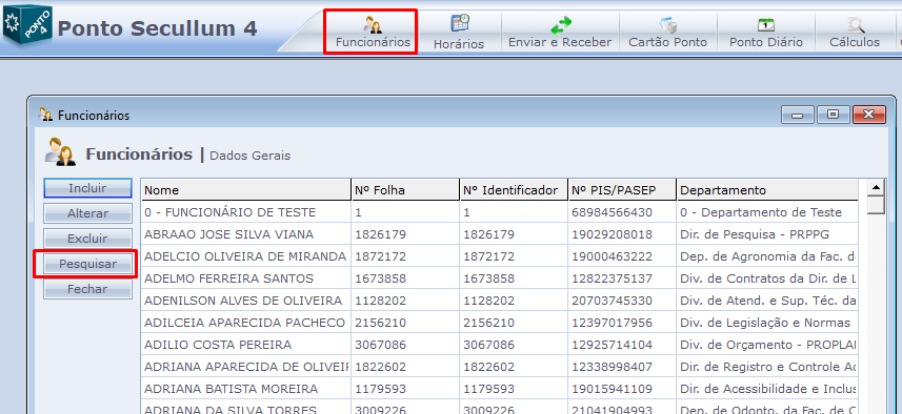
<span style="font-size: 10pt; font-family: Arial,sans-serif; color: #000000; background-color: transparent; font-weight: 400; font-style: normal; font-variant: normal; text-decoration: none; vertical-align: baseline; white-space: pre-wrap;">Em “Funcionários”, pesquise pelo nome ou pelo “Nº Folha” (SIAPE) do servidor.</span>

[![Img_01.png](https://documentacao.ufvjm.edu.br/uploads/images/gallery/2025-09/scaled-1680-/CtzjFhnwnQaFe25D-img-01.png)](https://documentacao.ufvjm.edu.br/uploads/images/gallery/2025-09/CtzjFhnwnQaFe25D-img-01.png)

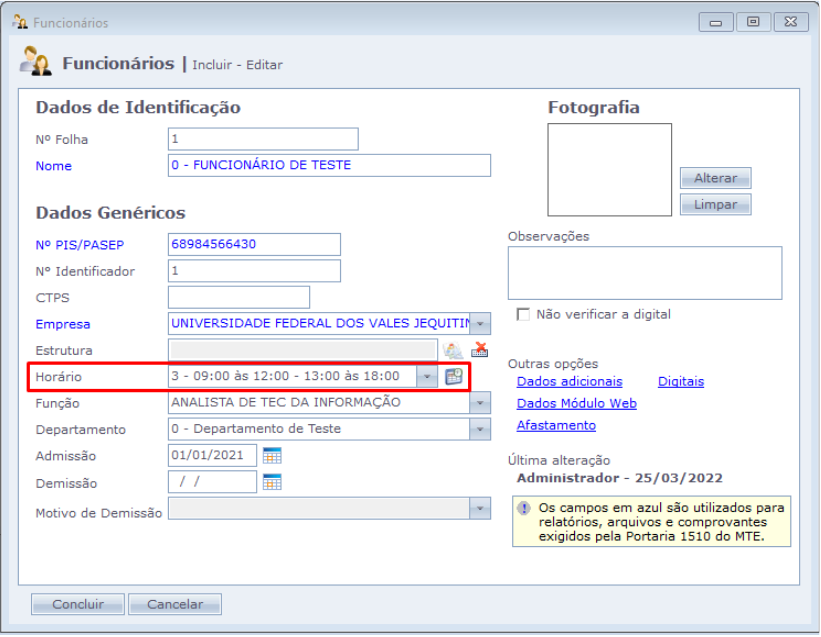
<span id="bkmrk-selecione-o-hor%C3%A1rio--1" style="font-size: 10pt; font-family: Arial,sans-serif; color: #000000; background-color: transparent; font-weight: 400; font-style: normal; font-variant: normal; text-decoration: none; vertical-align: baseline; white-space: pre-wrap;">Selecione o horário mais próximo do acordado com o servidor na lista e depois clique em **Concluir.**</span>

<span style="font-size: 10pt; font-family: Arial,sans-serif; color: #000000; background-color: transparent; font-weight: 400; font-style: normal; font-variant: normal; text-decoration: none; vertical-align: baseline; white-space: pre-wrap;">Obs.: Porque conta de alguns problemas no sistema, não será mais possível criar novas escalas de trabalho além das que já estão previamente cadastradas, mesmo que a escala esteja diferente, o sistema irá calcular normalmente a carga horária realizada.</span>

<span style="font-size: 10pt; font-family: Arial,sans-serif; color: #000000; background-color: transparent; font-weight: 400; font-style: normal; font-variant: normal; text-decoration: none; vertical-align: baseline; white-space: pre-wrap;">[![Img_02.png](https://documentacao.ufvjm.edu.br/uploads/images/gallery/2025-09/scaled-1680-/pNGNGfNc38yCdjMK-img-02.png)](https://documentacao.ufvjm.edu.br/uploads/images/gallery/2025-09/pNGNGfNc38yCdjMK-img-02.png)</span>

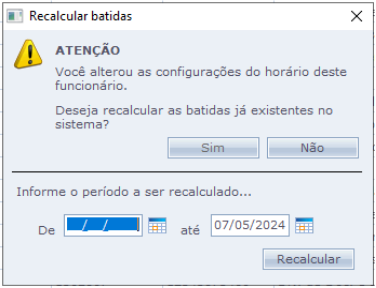
<span style="font-size: 10pt; font-family: Arial,sans-serif; color: #000000; background-color: transparent; font-weight: 400; font-style: normal; font-variant: normal; text-decoration: none; vertical-align: baseline; white-space: pre-wrap;">Caso seja necessário, recalcule as batidas de acordo com o período solicitado, colocando data inicial e final informada.</span>

<span style="font-size: 10pt; font-family: Arial,sans-serif; color: #000000; background-color: transparent; font-weight: 400; font-style: normal; font-variant: normal; text-decoration: none; vertical-align: baseline; white-space: pre-wrap;">Caso a data final não tenha sido informada, coloque a data do dia atual.</span>

<span style="font-size: 10pt; font-family: Arial, sans-serif; color: rgb(224, 62, 45); background-color: rgb(255, 255, 255); font-weight: 400; font-style: normal; font-variant: normal; text-decoration: none; vertical-align: baseline; white-space: pre-wrap;">**ATENÇÃO:** **MUITO CUIDADO AO INFORMAR A DATA INICIAL, PARA QUE NÃO SEJA RECALCULADO UM PERÍODO ERRADO, POIS ESSA AÇÃO NÃO PODERÁ SER DESFEITA.**</span>

<span style="font-size: 10pt; font-family: Arial, sans-serif; color: rgb(224, 62, 45); background-color: rgb(255, 255, 255); font-weight: 400; font-style: normal; font-variant: normal; text-decoration: none; vertical-align: baseline; white-space: pre-wrap;">**<span style="font-size: 10pt; font-family: Arial,sans-serif; color: #000000; background-color: transparent; font-weight: 400; font-style: normal; font-variant: normal; text-decoration: none; vertical-align: baseline; white-space: pre-wrap;">[![Img_03.png](https://documentacao.ufvjm.edu.br/uploads/images/gallery/2025-09/scaled-1680-/caiwPkCYUHMDE7TM-img-03.png)](https://documentacao.ufvjm.edu.br/uploads/images/gallery/2025-09/caiwPkCYUHMDE7TM-img-03.png)</span>**</span>

<span style="color: rgb(0, 0, 0);">**2 - Alteração de carga horária**</span>

\_\_\_\_\_\_\_\_\_\_\_\_\_\_\_\_\_\_\_\_\_\_\_\_\_\_\_\_\_\_\_\_\_\_\_\_\_\_\_\_\_\_\_\_\_\_\_\_\_\_\_\_\_\_\_\_\_\_\_\_\_\_\_\_\_\_\_\_\_\_\_\_\_\_\_\_\_\_\_\_\_\_\_\_\_\_\_\_\_\_\_\_\_\_\_\_\_\_\_\_\_\_\_\_\_\_\_\_\_\_\_\_\_\_\_

Em “Funcionários”, pesquise pelo nome ou pelo “Nº Folha” (SIAPE) do servidor.

[![Img_01.png](https://documentacao.ufvjm.edu.br/uploads/images/gallery/2025-09/scaled-1680-/CtzjFhnwnQaFe25D-img-01.png)](https://documentacao.ufvjm.edu.br/uploads/images/gallery/2025-09/CtzjFhnwnQaFe25D-img-01.png)
<span id="bkmrk-selecione-o-hor%C3%A1rio--3" style="font-size: 10pt; font-family: Arial,sans-serif; color: #000000; background-color: transparent; font-weight: 400; font-style: normal; font-variant: normal; text-decoration: none; vertical-align: baseline; white-space: pre-wrap;">Selecione o horário mais próximo do acordado com o servidor na lista e depois clique em **Concluir**:</span>

- <span style="font-size: 10pt; font-family: Arial,sans-serif; color: #000000; background-color: transparent; font-weight: bold; font-style: normal; font-variant: normal; text-decoration: none; vertical-align: baseline; white-space: pre-wrap;">Carga de 40 horas: </span><span style="font-size: 10pt; font-family: Arial,sans-serif; color: #000000; background-color: transparent; font-weight: 400; font-style: normal; font-variant: normal; text-decoration: none; vertical-align: baseline; white-space: pre-wrap;">horários do número 1 a 4;</span>
- <span style="font-size: 10pt; font-family: Arial,sans-serif; color: #000000; background-color: transparent; font-weight: bold; font-style: normal; font-variant: normal; text-decoration: none; vertical-align: baseline; white-space: pre-wrap;">Carga de 30 horas: </span><span style="font-size: 10pt; font-family: Arial,sans-serif; color: #000000; background-color: transparent; font-weight: 400; font-style: normal; font-variant: normal; text-decoration: none; vertical-align: baseline; white-space: pre-wrap;">horário <span style="font-size: 10pt; font-family: Arial,sans-serif; color: #000000; background-color: transparent; font-weight: 400; font-style: normal; font-variant: normal; text-decoration: none; vertical-align: baseline; white-space: pre-wrap;">do número </span>52;</span>
- <span style="font-size: 10pt; font-family: Arial,sans-serif; color: #000000; background-color: transparent; font-weight: 400; font-style: normal; font-variant: normal; text-decoration: none; vertical-align: baseline; white-space: pre-wrap;"><span style="font-size: 10pt; font-family: Arial,sans-serif; color: #000000; background-color: transparent; font-weight: bold; font-style: normal; font-variant: normal; text-decoration: none; vertical-align: baseline; white-space: pre-wrap;">Carga de 20 horas: </span><span style="font-size: 10pt; font-family: Arial,sans-serif; color: #000000; background-color: transparent; font-weight: 400; font-style: normal; font-variant: normal; text-decoration: none; vertical-align: baseline; white-space: pre-wrap;">horário <span style="font-size: 10pt; font-family: Arial,sans-serif; color: #000000; background-color: transparent; font-weight: 400; font-style: normal; font-variant: normal; text-decoration: none; vertical-align: baseline; white-space: pre-wrap;">do número </span>6;</span></span>

<span style="font-size: 10pt; font-family: Arial,sans-serif; color: #000000; background-color: transparent; font-weight: 400; font-style: normal; font-variant: normal; text-decoration: none; vertical-align: baseline; white-space: pre-wrap;">Obs.: Porque conta de alguns problemas no sistema, não será mais possível criar novas escalas de trabalho além das que já estão previamente cadastradas, mesmo que a escala esteja diferente, o sistema irá calcular normalmente a carga horária realizada.</span>

<span style="font-size: 10pt; font-family: Arial,sans-serif; color: #000000; background-color: transparent; font-weight: 400; font-style: normal; font-variant: normal; text-decoration: none; vertical-align: baseline; white-space: pre-wrap;">[![Img_02.png](https://documentacao.ufvjm.edu.br/uploads/images/gallery/2025-09/scaled-1680-/pNGNGfNc38yCdjMK-img-02.png)](https://documentacao.ufvjm.edu.br/uploads/images/gallery/2025-09/pNGNGfNc38yCdjMK-img-02.png)</span>

Caso seja necessário, recalcule as batidas de acordo com o período solicitado, colocando data inicial e final informada.

Caso a data final não tenha sido informada, coloque a data do dia atual.

<span style="font-size: 10pt; font-family: Arial, sans-serif; color: rgb(224, 62, 45); background-color: rgb(255, 255, 255); font-weight: 400; font-style: normal; font-variant: normal; text-decoration: none; vertical-align: baseline; white-space: pre-wrap;">**ATENÇÃO:** **MUITO CUIDADO AO INFORMAR A DATA INICIAL, PARA QUE NÃO SEJA RECALCULADO UM PERÍODO ERRADO, POIS ESSA AÇÃO NÃO PODERÁ SER DESFEITA.**</span>

<span style="font-size: 10pt; font-family: Arial, sans-serif; color: rgb(224, 62, 45); background-color: rgb(255, 255, 255); font-weight: 400; font-style: normal; font-variant: normal; text-decoration: none; vertical-align: baseline; white-space: pre-wrap;">**<span style="font-size: 10pt; font-family: Arial,sans-serif; color: #000000; background-color: transparent; font-weight: 400; font-style: normal; font-variant: normal; text-decoration: none; vertical-align: baseline; white-space: pre-wrap;">[![Img_03.png](https://documentacao.ufvjm.edu.br/uploads/images/gallery/2025-09/scaled-1680-/caiwPkCYUHMDE7TM-img-03.png)](https://documentacao.ufvjm.edu.br/uploads/images/gallery/2025-09/caiwPkCYUHMDE7TM-img-03.png)</span>**</span>