# Conexão manual - Windows 8,10,11...

<div class="translate-tooltip-mtz translator-hidden" id="bkmrk-translator"><div class="header">  
</div></div>##### **Para configurar a rede Eduroam no Windows 8 acima, siga os seguintes passos:**

##### **Passo1:**

1. Clicar no botão "**Iniciar**";
2. Pesquisar por "*Wi-fi*" no campo de pesquisa;
3. Abrir as Configurações de *Wi-fi*;
4. Acessar "**Gerenciar redes conhecidas**";
5. Clicar em "**Remover a rede *eduroam***";

##### **Passo 2:**

1. <span style="font-size: 10pt; font-family: Arial,sans-serif; color: #000000; background-color: transparent; font-weight: 400; font-style: normal; font-variant: normal; text-decoration: none; vertical-align: baseline; white-space: pre-wrap;">Acesse o portal cat.eduroam.org pesquise por “</span><span style="font-size: 10pt; font-family: Arial,sans-serif; color: #000000; background-color: transparent; font-weight: bold; font-style: normal; font-variant: normal; text-decoration: none; vertical-align: baseline; white-space: pre-wrap;">UFVJM” </span><span style="font-size: 10pt; font-family: Arial,sans-serif; color: #000000; background-color: transparent; font-weight: 400; font-style: normal; font-variant: normal; text-decoration: none; vertical-align: baseline; white-space: pre-wrap;">ou, caso o manual estiver online, clique no link abaixo: </span><span style="font-size: 10pt; font-family: Arial,sans-serif; color: #1155cc; background-color: transparent; font-weight: 400; font-style: normal; font-variant: normal; text-decoration: none; vertical-align: baseline; white-space: pre-wrap;">https://cat.eduroam.org/?idp=6172&amp;profile=9208</span><span style="font-size: 10pt; font-family: Arial,sans-serif; color: #000000; background-color: transparent; font-weight: 400; font-style: normal; font-variant: normal; text-decoration: none; vertical-align: baseline; white-space: pre-wrap;">. </span>
    1. <span style="font-size: 10pt; font-family: Arial,sans-serif; color: #000000; background-color: transparent; font-weight: 400; font-style: normal; font-variant: normal; text-decoration: none; vertical-align: baseline; white-space: pre-wrap;">Depois de baixar o aplicativo, </span><span style="font-size: 10pt; font-family: Arial,sans-serif; color: #000000; background-color: transparent; font-weight: bold; font-style: normal; font-variant: normal; text-decoration: none; vertical-align: baseline; white-space: pre-wrap;">instale-o </span><span style="font-size: 10pt; font-family: Arial,sans-serif; color: #000000; background-color: transparent; font-weight: 400; font-style: normal; font-variant: normal; text-decoration: none; vertical-align: baseline; white-space: pre-wrap;">e siga as instruções do aplicativo. </span>
2. <span style="font-size: 10pt; font-family: Arial,sans-serif; color: #000000; background-color: transparent; font-weight: 400; font-style: normal; font-variant: normal; text-decoration: none; vertical-align: baseline; white-space: pre-wrap;">Em seguida, clique em Iniciar e pesquise por “</span><span style="font-size: 10pt; font-family: Arial,sans-serif; color: #000000; background-color: transparent; font-weight: bold; font-style: normal; font-variant: normal; text-decoration: none; vertical-align: baseline; white-space: pre-wrap;">Painel” </span><span style="font-size: 10pt; font-family: Arial,sans-serif; color: #000000; background-color: transparent; font-weight: 400; font-style: normal; font-variant: normal; text-decoration: none; vertical-align: baseline; white-space: pre-wrap;">e clique em </span><span style="font-size: 11pt; font-family: Arial,sans-serif; color: #000000; background-color: transparent; font-weight: 400; font-style: normal; font-variant: normal; text-decoration: none; vertical-align: baseline; white-space: pre-wrap;">“</span><span style="font-size: 12pt; font-family: Arial,sans-serif; color: #000000; background-color: transparent; font-weight: bold; font-style: normal; font-variant: normal; text-decoration: underline; -webkit-text-decoration-skip: none; text-decoration-skip-ink: none; vertical-align: baseline; white-space: pre-wrap;">Painel de Controle</span><span style="font-size: 11pt; font-family: Arial,sans-serif; color: #000000; background-color: transparent; font-weight: bold; font-style: normal; font-variant: normal; text-decoration: underline; -webkit-text-decoration-skip: none; text-decoration-skip-ink: none; vertical-align: baseline; white-space: pre-wrap;">”</span><span style="font-size: 11pt; font-family: Arial,sans-serif; color: #000000; background-color: transparent; font-weight: bold; font-style: normal; font-variant: normal; text-decoration: none; vertical-align: baseline; white-space: pre-wrap;">. </span>
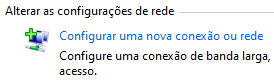
3. <span style="font-size: 10pt; font-family: Arial,sans-serif; color: #000000; background-color: transparent; font-weight: 400; font-style: normal; font-variant: normal; text-decoration: none; vertical-align: baseline; white-space: pre-wrap;">Abra “</span><span style="font-size: 10pt; font-family: Arial,sans-serif; color: #000000; background-color: transparent; font-weight: bold; font-style: normal; font-variant: normal; text-decoration: none; vertical-align: baseline; white-space: pre-wrap;">Central de redes de compartilhamento</span><span style="font-size: 10pt; font-family: Arial,sans-serif; color: #000000; background-color: transparent; font-weight: 400; font-style: normal; font-variant: normal; text-decoration: none; vertical-align: baseline; white-space: pre-wrap;">”</span><span id="bkmrk--2" style="font-size: 10pt; font-family: Arial,sans-serif; color: #000000; background-color: transparent; font-weight: 400; font-style: normal; font-variant: normal; text-decoration: none; vertical-align: baseline; white-space: pre-wrap;"></span>
    1. <span id="bkmrk-" style="font-size: 11pt; font-family: Arial,sans-serif; color: #000000; background-color: transparent; font-weight: 400; font-style: normal; font-variant: normal; text-decoration: none; vertical-align: baseline; white-space: pre-wrap;"><span style="border: 2pt solid #000000; display: inline-block; overflow: hidden; width: 153px; height: 50px;">![](https://lh7-rt.googleusercontent.com/docsz/AD_4nXculI4EKjZrsmg07cZrWCgrC79GGeyqIpOj60zUDOUWa3jh3jJa16b5y2fNl87k6IobWfx19iBAiEv10lR3_8vLXH86DT_XABwTzFxNdbSwnICZPYGvNW9CikKEo4poawBFCSeuVgFMQcbCMT6JNhZXjA?key=UFOTCocqCvSYUxIiTqbubA)</span></span>
    2. <span id="bkmrk--1" style="font-size: 11pt; font-family: Arial,sans-serif; color: #000000; background-color: transparent; font-weight: 400; font-style: normal; font-variant: normal; text-decoration: none; vertical-align: baseline; white-space: pre-wrap;"><span style="border: 2pt solid #000000; filter: contrast(0.71); display: inline-block; overflow: hidden; width: 237px; height: 71px;">![](https://lh7-rt.googleusercontent.com/docsz/AD_4nXcIV8YlfpTMgbtCN8IJrChdL6sOuJSMJ_yoc46b1yken9w8hSzKCETsGPe9U5-t1j_0pqacSYa5yfxKaJQQbK2WOoJP7YOpsGcc4o03cFmYhTV95OrvZaT4fpyRuLkNJibeMZLKFJsLkWmFmb6ya-kctmk?key=UFOTCocqCvSYUxIiTqbubA)</span></span>
    3. <span style="font-size: 10pt; font-family: Arial,sans-serif; color: #000000; background-color: transparent; font-weight: 400; font-style: normal; font-variant: normal; text-decoration: none; vertical-align: baseline; white-space: pre-wrap;"> </span><span id="bkmrk--3" style="font-size: 11pt; font-family: Arial,sans-serif; color: #000000; background-color: transparent; font-weight: 400; font-style: normal; font-variant: normal; text-decoration: none; vertical-align: baseline; white-space: pre-wrap;"><span style="border: 2pt solid #000000; display: inline-block; overflow: hidden; width: 361px; height: 49px;">![](https://lh7-rt.googleusercontent.com/docsz/AD_4nXcqNQgBD0Mxi5j3UMdel-TJlNb2oEljNpRa7O2lPU48t1ky2PMisOe25paH1I_C7nPwUccl0hPZByKAfqODA7fUMo6v4qY-H8jlR27jy0B2DyNg_cyplTpOs3rQHn8_KGtcJz_F5LVlklaBhe-0rD1TPg?key=UFOTCocqCvSYUxIiTqbubA)</span></span>
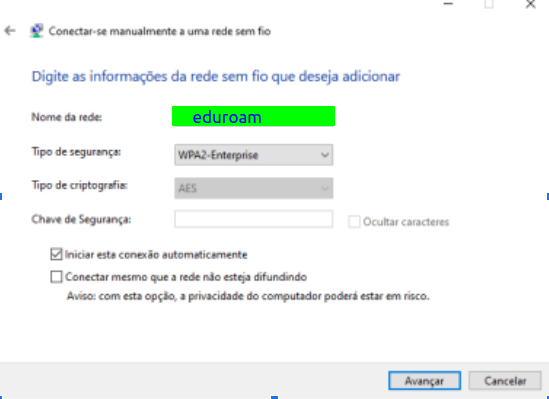
4. <span style="font-size: 10pt; font-family: Arial,sans-serif; color: #000000; background-color: transparent; font-weight: 400; font-style: normal; font-variant: normal; text-decoration: none; vertical-align: baseline; white-space: pre-wrap;">Digite o </span><span style="font-size: 10pt; font-family: Arial, sans-serif; color: rgb(0, 0, 0); background-color: transparent; font-style: normal; font-variant: normal; text-decoration: none; vertical-align: baseline; white-space: pre-wrap;">“Nome da rede: </span><span style="font-size: 10pt; font-family: Arial,sans-serif; color: #000000; background-color: transparent; font-weight: bold; font-style: normal; font-variant: normal; text-decoration: none; vertical-align: baseline; white-space: pre-wrap;">eduroam </span><span style="font-size: 10pt; font-family: Arial, sans-serif; color: rgb(0, 0, 0); background-color: transparent; font-style: normal; font-variant: normal; text-decoration: none; vertical-align: baseline; white-space: pre-wrap;">e Tipo da rede:</span><span style="font-size: 10pt; font-family: Arial,sans-serif; color: #000000; background-color: transparent; font-weight: bold; font-style: normal; font-variant: normal; text-decoration: none; vertical-align: baseline; white-space: pre-wrap;"> </span><span style="font-size: 10pt; font-family: Arial, sans-serif; color: rgb(0, 0, 0); background-color: transparent; font-style: normal; font-variant: normal; text-decoration: none; vertical-align: baseline; white-space: pre-wrap;"><span id="bkmrk-wpa2-enterprise" style="font-size: 10pt; font-family: Arial,sans-serif; color: #000000; background-color: transparent; font-weight: 400; font-style: normal; font-variant: normal; text-decoration: none; vertical-align: baseline; white-space: pre-wrap;">**WPA2-Enterprise** </span></span><span style="font-size: 10pt; font-family: Arial,sans-serif; color: #000000; background-color: transparent; font-weight: bold; font-style: normal; font-variant: normal; text-decoration: none; vertical-align: baseline; white-space: pre-wrap;">” </span><span style="font-size: 10pt; font-family: Arial,sans-serif; color: #000000; background-color: transparent; font-weight: 400; font-style: normal; font-variant: normal; text-decoration: none; vertical-align: baseline; white-space: pre-wrap;">do seu setor e clique em “</span><span style="font-size: 10pt; font-family: Arial,sans-serif; color: #000000; background-color: transparent; font-weight: bold; font-style: normal; font-variant: normal; text-decoration: none; vertical-align: baseline; white-space: pre-wrap;">Avançar''</span><span style="font-size: 10pt; font-family: Arial,sans-serif; color: #000000; background-color: transparent; font-weight: 400; font-style: normal; font-variant: normal; text-decoration: none; vertical-align: baseline; white-space: pre-wrap;">. </span>
    
    <span style="font-size: 10pt; font-family: Arial,sans-serif; color: #000000; background-color: transparent; font-weight: 400; font-style: normal; font-variant: normal; text-decoration: none; vertical-align: baseline; white-space: pre-wrap;"> [![image.png](https://documentacao.ufvjm.edu.br/uploads/images/gallery/2024-02/scaled-1680-/4fqot6pxx5piUWtJ-image.png)](https://documentacao.ufvjm.edu.br/uploads/images/gallery/2024-02/4fqot6pxx5piUWtJ-image.png)</span>
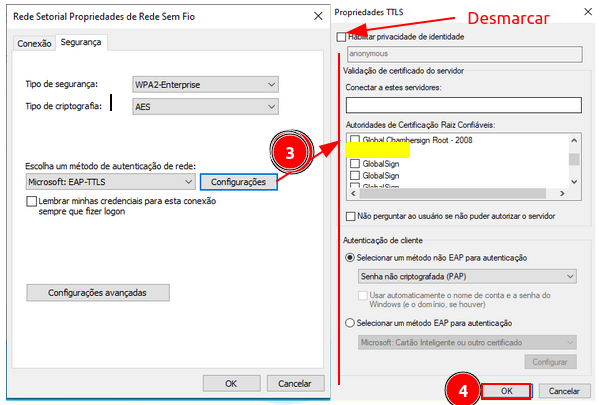
5. <span style="font-size: 10pt; font-family: Arial,sans-serif; color: #000000; background-color: transparent; font-weight: 400; font-style: normal; font-variant: normal; text-decoration: none; vertical-align: baseline; white-space: pre-wrap;"><span id="bkmrk-clique-em-%E2%80%9C" style="font-size: 10pt; font-family: Arial,sans-serif; color: #000000; background-color: transparent; font-weight: 400; font-style: normal; font-variant: normal; text-decoration: none; vertical-align: baseline; white-space: pre-wrap;">Clique em “</span><span style="font-size: 10pt; font-family: Arial,sans-serif; color: #000000; background-color: transparent; font-weight: bold; font-style: normal; font-variant: normal; text-decoration: none; vertical-align: baseline; white-space: pre-wrap;">Alterar configurações de conexão”.</span></span>[![image.png](https://documentacao.ufvjm.edu.br/uploads/images/gallery/2024-02/scaled-1680-/tksJMVOOulYUfasb-image.png)](https://documentacao.ufvjm.edu.br/uploads/images/gallery/2024-02/tksJMVOOulYUfasb-image.png)
6. [<span style="background-color: rgb(255, 255, 255); color: rgb(0, 0, 0);">Esse ponto é muito importante, deverá ser seguido todos os passos, da forma que está sendo mostrado.</span>  
    <span style="background-color: rgb(255, 255, 255); color: rgb(0, 0, 0);">a. Clique na aba "Segurança", vai ser mostrado a tela abaixo:</span>](https://documentacao.ufvjm.edu.br/uploads/images/gallery/2024-02/RsUDPc21ZZgORDeU-image.png)[![image.png](https://documentacao.ufvjm.edu.br/uploads/images/gallery/2024-02/scaled-1680-/lqLgZl5H6LL5lxg1-image.png)](https://documentacao.ufvjm.edu.br/uploads/images/gallery/2024-02/lqLgZl5H6LL5lxg1-image.png)
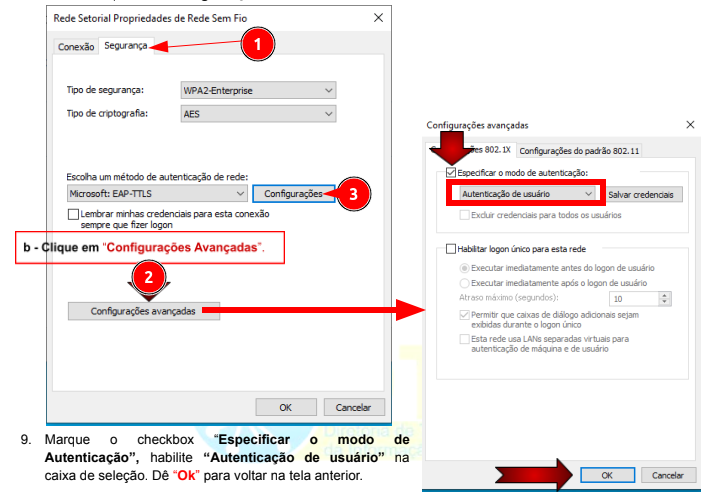
7. <span id="bkmrk-desabilite" style="font-size: 10pt; font-family: Arial,sans-serif; color: #ff0000; background-color: transparent; font-weight: bold; font-style: normal; font-variant: normal; text-decoration: underline; -webkit-text-decoration-skip: none; text-decoration-skip-ink: none; vertical-align: baseline; white-space: pre-wrap;">Desabilite</span><span style="font-size: 10pt; font-family: Arial,sans-serif; color: #000000; background-color: transparent; font-weight: 400; font-style: normal; font-variant: normal; text-decoration: none; vertical-align: baseline; white-space: pre-wrap;"> o checkbox “</span><span style="font-size: 10pt; font-family: Arial,sans-serif; color: #000000; background-color: transparent; font-weight: bold; font-style: normal; font-variant: normal; text-decoration: none; vertical-align: baseline; white-space: pre-wrap;">Privacidade de identidade</span><span style="font-size: 10pt; font-family: Arial,sans-serif; color: #000000; background-color: transparent; font-weight: 400; font-style: normal; font-variant: normal; text-decoration: none; vertical-align: baseline; white-space: pre-wrap;">”.</span>
    1. [![image.png](https://documentacao.ufvjm.edu.br/uploads/images/gallery/2024-02/scaled-1680-/gaoSXT1A4I5Gfmkw-image.png)](https://documentacao.ufvjm.edu.br/uploads/images/gallery/2024-02/gaoSXT1A4I5Gfmkw-image.png)
8. <span style="font-size: 10pt; font-family: Arial,sans-serif; color: #000000; background-color: transparent; font-weight: 400; font-style: normal; font-variant: normal; text-decoration: none; vertical-align: baseline; white-space: pre-wrap;">A partir de agora tente se </span><span style="font-size: 10pt; font-family: Arial,sans-serif; color: #000000; background-color: transparent; font-weight: bold; font-style: normal; font-variant: normal; text-decoration: none; vertical-align: baseline; white-space: pre-wrap;">conectar</span><span style="font-size: 10pt; font-family: Arial,sans-serif; color: #000000; background-color: transparent; font-weight: 400; font-style: normal; font-variant: normal; text-decoration: none; vertical-align: baseline; white-space: pre-wrap;"> na rede que foi configurada.</span>